 Admino
Admino, on your phone
Answer a customer while you are away from your desk. Check what your automations replied overnight. Approve a post from the bus.
- Android 7 and newer
- iPhone on iOS 17 and newer
- Free to download
Where to get it
- Direct download(with one-tap updates inside the app)Version 1.16.0 · 76.2 MB
 Android · updates itself through Bazaar
 Android · updates itself through Myket
- Web appNothing to install, on any phone or computer
Coming soon
- Google PlayComing soon
Coming soon
- App StoreComing soon
If you get stuck
Open the part you need; everything is here.
Install the direct file in five steps
Rather not use a store? Get the file straight from our server. Android shows a few safety prompts; further down this page we show, with screenshots, exactly what to tap.
Tap download
If Chrome asks "This type of file can harm your device", tap OK; Chrome says this about every install file. On a slow connection give it time; an interrupted download resumes from Chrome's Downloads list.
Open the file
Tap Open, or pull down the notification shade and tap admino.apk.
Allow installs from this source
Because the file did not come from a store, Android asks once: tap Settings, turn on Allow from this source and go back.
Tap Install
If Google Play Protect shows "App scan recommended", tap Scan app, and when it says "This app looks safe", tap Install. If the scan never finishes: More details, then Install without scanning.
Sign in with your phone number
The same account you use on the website. Your pages, auto-replies and conversations are all there.
Android 7 or later · at least 500 MB free · phones and tablets
File details and fingerprint
Android 7 or later · at least 500 MB free · phones and tablets
- Version
- 1.16.0
- Size
- 76.2 MB
- Published
- November 2, 2026
12c7c9b859139919094596b6e11aef03089fb960c4abaa9f3e79852307964a76How can I be sure the file is untouched?
After downloading, run one of these commands on a computer and compare the result with the string above. If a single character differs, do not install it, and tell us.
shasum -a 256 admino.apkcertutil -hashfile admino.apk SHA256Illustrated install guide
These screenshots were taken while installing this very file on an Android phone, and the button to tap is ringed. If your phone is set to another language the words differ, but the buttons are in the same place.
Swipe the screenshots to see the next step
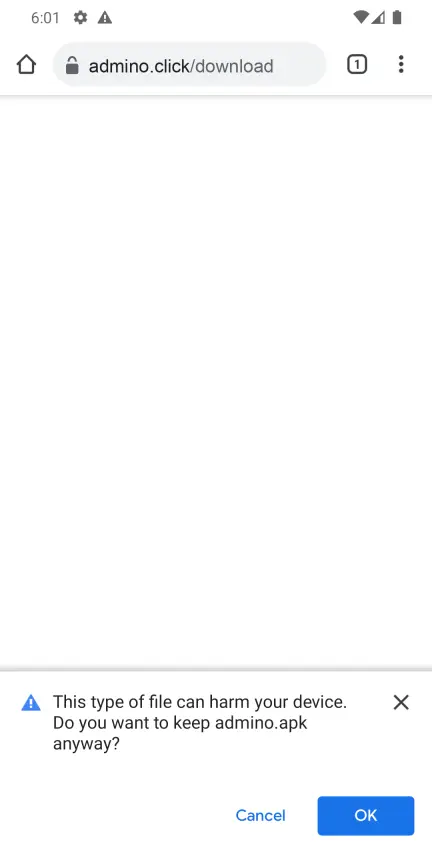 Step 1
Chrome asks to keep the file: OK
Chrome shows this for every install file; it is not about Admino. Tap OK and the download starts.
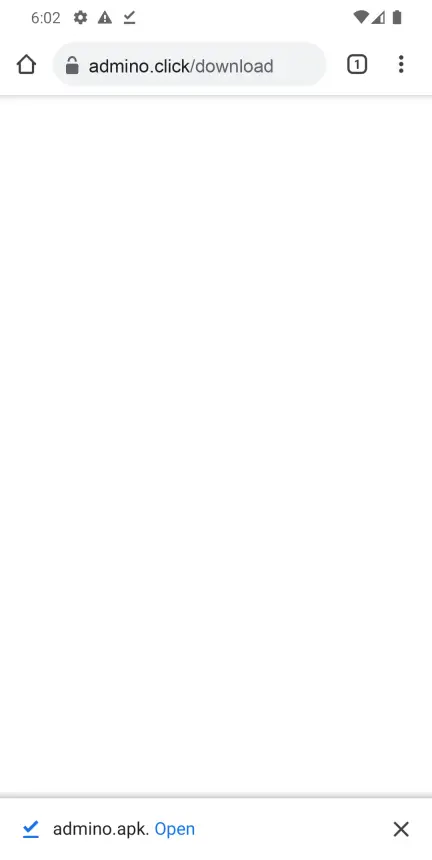 Step 2
When it has downloaded: Open
Missed the bar? Pull down the notification shade and tap admino.apk.
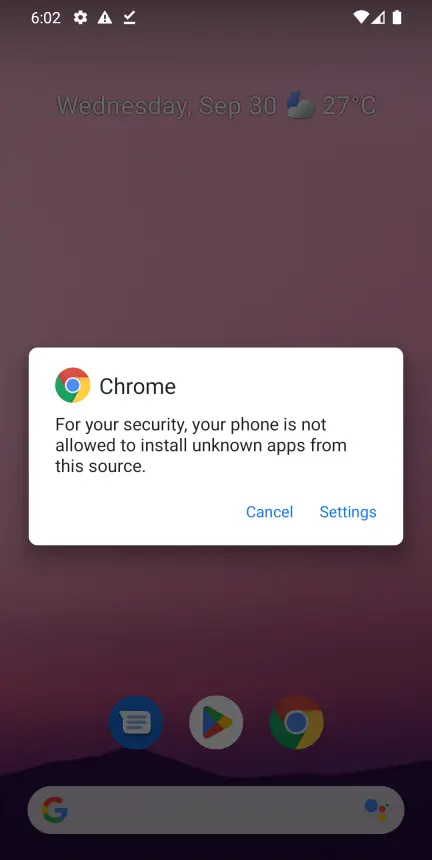 Step 3
Android asks permission: Settings
"For your security, your phone is not allowed…" means the browser may not install apps yet. Tap Settings.
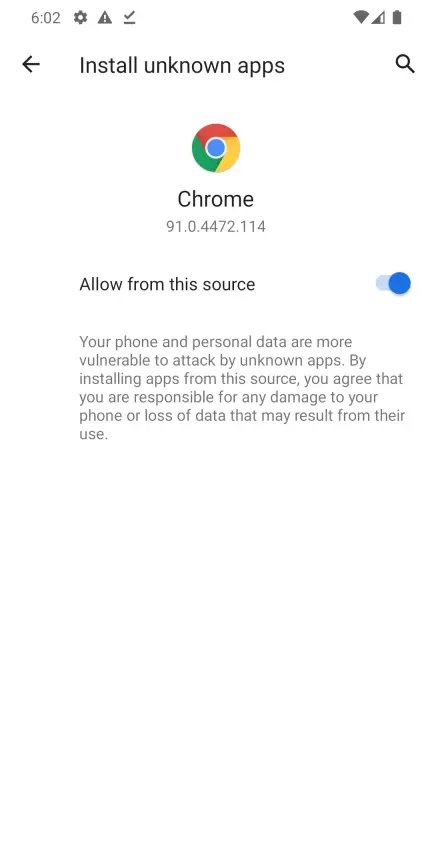 Step 4
Turn on Allow from this source
You only do this once. Then press your phone's back button.
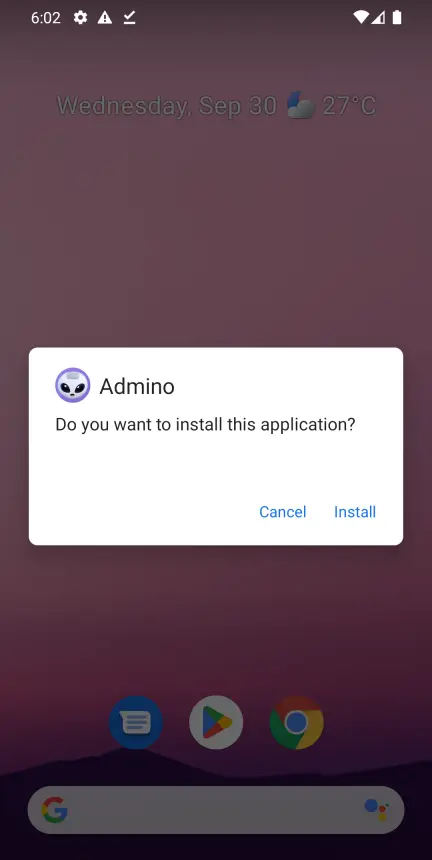 Step 5
Tap Install
"Do you want to install this application?" appears; tap Install.
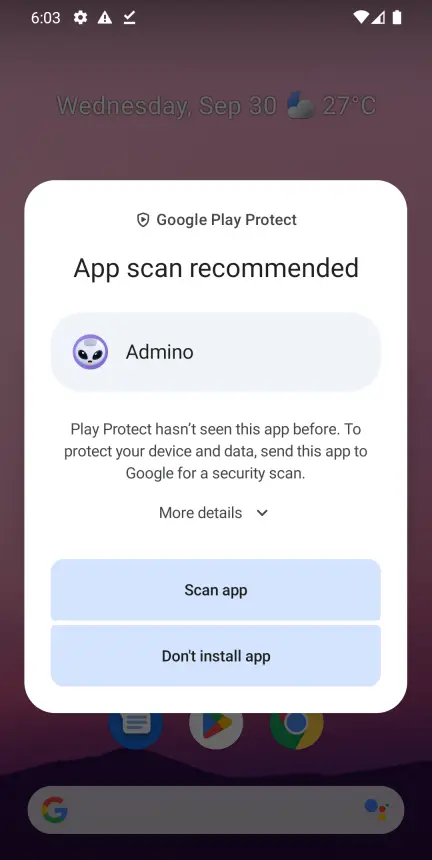 Step 6
Google Play Protect: Scan app
Play Protect checks any file it has not seen before, once. Tap Scan app; it takes about a minute. Don't install app cancels the install.
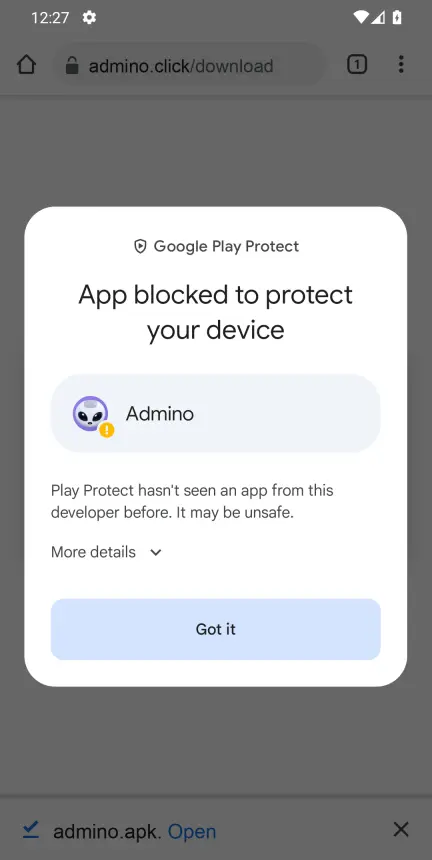 Step 7
If it says App blocked to protect your device: More details
Current Play Protect stops a file it has not seen yet like this, with a single Got it button that abandons the install. Don't tap it; tap More details.
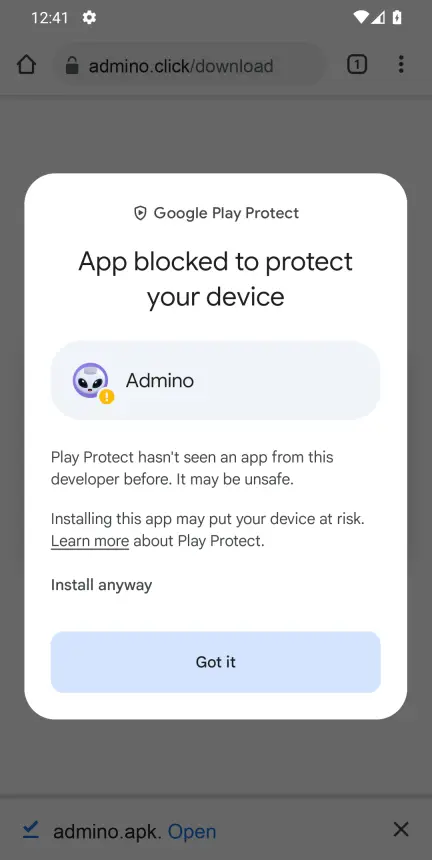 Step 8
Then: Install anyway
Under More details there is Install anyway: a line of text, not a button. Tap it.
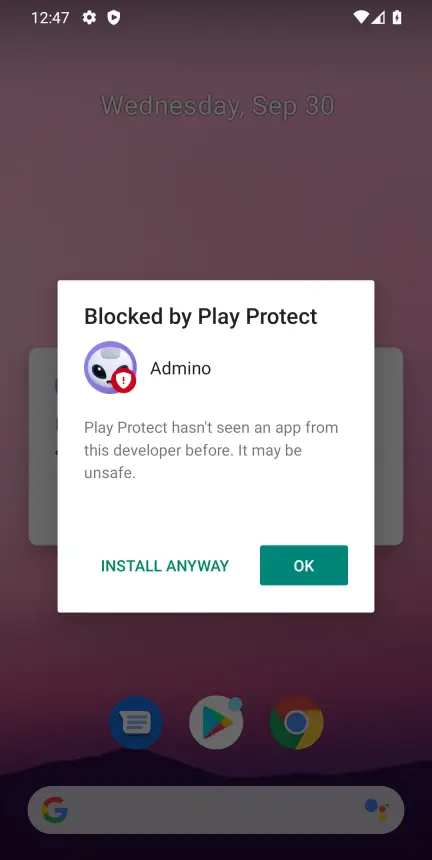 Step 9
If it says Blocked by Play Protect: INSTALL ANYWAY
On some phones the same check looks like this: "Play Protect hasn't seen an app from this developer before". The bold OK button cancels the install; tap INSTALL ANYWAY. If it then offers to send the app to Google for scanning, tap Send.
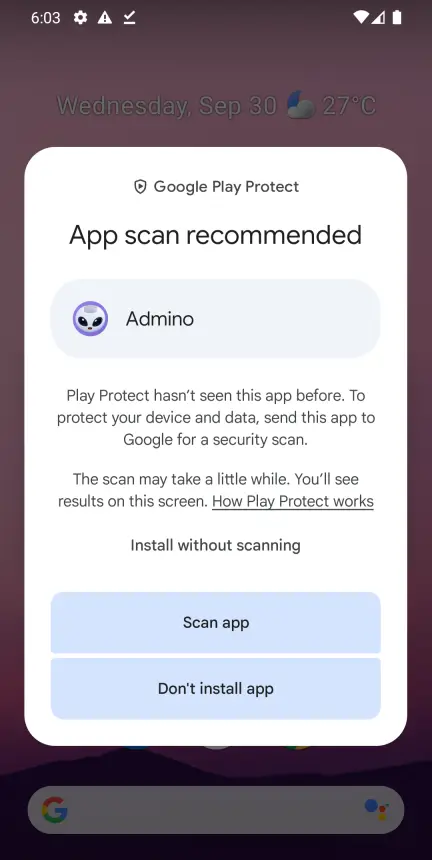 Step 10
If the scan never finishes: Install without scanning
The scan needs to reach Google and sometimes cannot from Iran. Tap More details and choose Install without scanning.
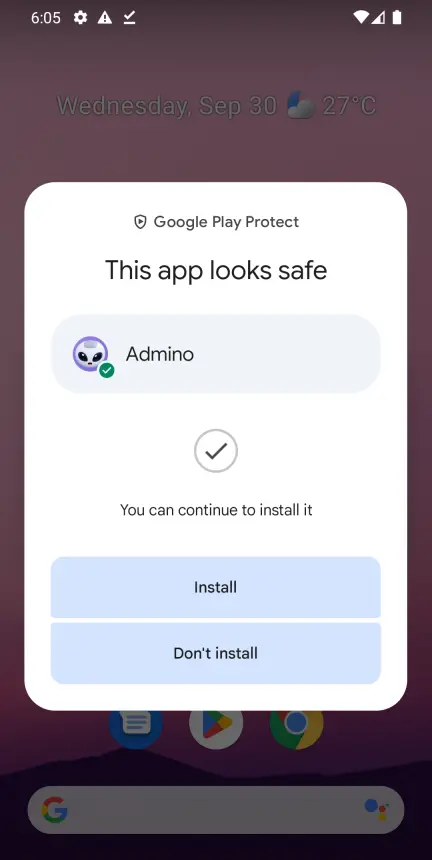 Step 11
This app looks safe: Install
That is Google's verdict on Admino. Tap Install.
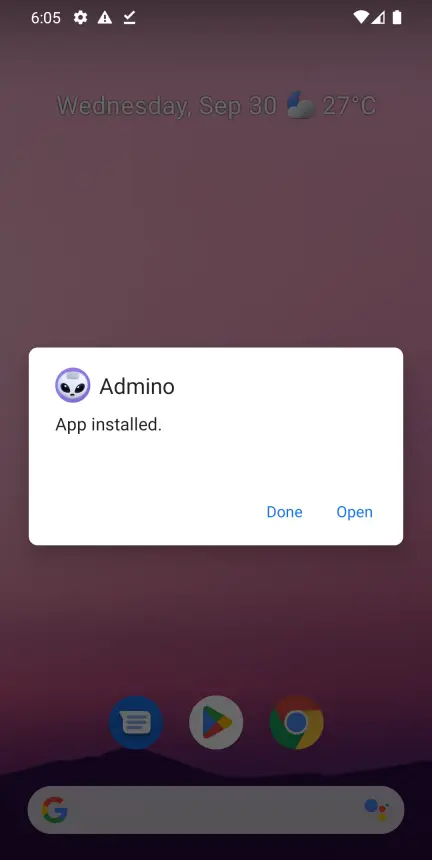 Step 12
Installed: Open
Tap Open and sign in with your phone number. The Admino icon is with your other apps too.
The Google Play Protect warning
Play Protect is Android's built-in malware scanner, and it checks, once, any app it has not seen that did not come from Google Play. Admino is not on Google Play because Google Play is not available in Iran, so the prompt is about where the file came from, not a virus. When Google has scanned this file, its verdict was "This app looks safe". Depending on your phone's version you will see one of these:
App scan recommended
Tap Scan app, wait for "This app looks safe", then tap Install.
App blocked to protect your device
Don't tap Got it; it abandons the install. Tap More details, then Install anyway.
The scan hangs or fails
Open More details and tap Install without scanning.
Blocked by Play Protect or Unsafe app blocked
If it says "Play Protect hasn't seen an app from this developer before", do not tap OK, which cancels the install; tap INSTALL ANYWAY. On some versions open More details first.
No install button at all
Turn Play Protect off for a moment: open Google Play › your profile picture › Play Protect › the settings gear › turn off Scan apps with Play Protect. Install Admino, then turn it back on.
A guide for each phone brand
Some brands add a safety lock of their own. Pick your phone; if you came here on your phone, we have guessed its brand already.
Samsung
Galaxy A, S, M, Z and Tab · One UI
- 1
If you see "Blocked by Auto Blocker": Settings › Security and privacy › Auto Blocker, turn it off. You can turn it back on after installing.
- 2
When the phone asks, tap Settings and turn on Allow from this source for Chrome or My Files. Or beforehand: Settings › Apps › three-dot menu › Special access › Install unknown apps.
- 3
Then tap Install.
If Google Play Protect shows a prompt, see "If Play Protect stops the install" on this page.
Xiaomi, Redmi and POCO
MIUI and HyperOS
- 1
When the phone asks, tap Settings and turn on Allow from this source (or: Settings › Privacy protection › Special permissions › Install unknown apps).
- 2
Xiaomi's security check counts down for a few seconds; wait until Continue installation is enabled and tap it.
- 3
If it asks you to sign in to a Mi account, sign in or choose to continue the installation.
If Google Play Protect shows a prompt, see "If Play Protect stops the install" on this page.
Huawei and Honor
EMUI, HarmonyOS and MagicOS
- 1
If a Pure Mode message appears, tap Continue installation, or turn it off: Settings › System & updates › Pure Mode.
- 2
Allow installs from external sources: Settings › Security › More settings › Install apps from external sources.
- 3
Huawei phones without Google services show no Play Protect prompt.
If Google Play Protect shows a prompt, see "If Play Protect stops the install" on this page.
OPPO, realme and OnePlus
ColorOS, realme UI and OxygenOS
- 1
Allow installs: tap Settings when asked, or Settings › Apps › Special app access › Install unknown apps.
- 2
If the Installation security check asks for your OPPO or realme account password, enter it; without an account, turn that check off for a moment in the phone's security settings.
- 3
Then tap Install.
If Google Play Protect shows a prompt, see "If Play Protect stops the install" on this page.
vivo and iQOO
Funtouch OS and OriginOS
- 1
Allow installs: tap Settings when asked, or Settings › Security › Install unknown apps.
- 2
If Secure installation asks for your vivo account password, enter it; without an account, turn Secure installation off for a moment in the security settings.
- 3
Then tap Install.
If Google Play Protect shows a prompt, see "If Play Protect stops the install" on this page.
Pixel, Motorola, Nokia, Sony and the rest
Stock Android and close to it
- 1
Exactly like the screenshots above: OK in Chrome, Open, Settings and Allow from this source, then Install.
- 2
Android tablets follow the same steps.
If Google Play Protect shows a prompt, see "If Play Protect stops the install" on this page.
Menu names vary between versions. If you cannot find one, type "unknown" into the search at the top of your phone's Settings.
If the install did not finish
Find the exact message your phone showed; the fix is next to it.
App not installed
Usually one of three things: a copy of Admino from somewhere else is already installed (uninstall it and install again; your data is on our server), there is not enough free space (at least 500 MB is needed), or the file did not download completely.
There was a problem parsing the package
The file is incomplete or the phone runs Android older than 7. Compare the size of admino.apk in Downloads with the size on this page and download again if it is smaller. On older Android, open the web app.
App not installed as package conflicts with an existing package
A copy of Admino signed differently is installed. Uninstall it, then install this file.
Blocked by Auto Blocker (Samsung)
Settings › Security and privacy › Auto Blocker: turn it off, install, then turn it back on.
The download keeps stopping
Download on stable Wi-Fi in Chrome. An interrupted download resumes from Chrome's Downloads list instead of starting again.
It downloaded but will not open
Open your phone's Files or My Files app, go to Downloads and tap admino.apk. If it asks which app to open it with, choose Package installer.
Still stuck?
Contact support with your phone model, Android version and the exact message or a screenshot; we will look at it ourselves.
Installing on iPhone and iPad
The iPhone app is published on Sibapp: the same app, with the same account. If you would rather not use Sibapp, the web app is there too.
Install from Sibapp
Install Sibapp
Open sibapp.com in Safari, sign up and install the Sibapp profile. Registering a device can take up to 72 hours, and the install link arrives by SMS.
Turn on Developer Mode
On iOS 16 and newer: Settings › Privacy & Security › Developer Mode, then restart the phone. Sibapp requires this.
Install Admino from Sibapp
Tap the Sibapp button on this page, or search for Admino in Sibapp.
Sign in with your phone number
The same account you use on the web; everything is where you left it.

Sibapp charges its own subscription to register a device; Admino charges nothing to install.
The web app, nothing to install
Open app.admino.click in Safari
It has to be Safari. Chrome and Firefox on iOS cannot add apps to the home screen; that is an iOS restriction, not ours.
Tap the Share button
The square with an arrow pointing up, at the bottom of the screen.
Choose Add to Home Screen
Scroll down the share sheet if you do not see it straight away.
Tap Add
The Admino icon joins your home screen. Opening it from there gives you the full screen, with no browser bar.
File safety
It is a fair question and it deserves a real answer rather than reassurance.
A store or the direct file?
Both are the same Admino. Installed from a store, it updates itself and you see no warning. The direct file is for anybody without one of those stores.
What the warning actually means
Android is telling you the file did not come from a store it checks. It is not a virus alert. You are being asked to decide whether you trust where it came from; in this case, admino.click over HTTPS.
How to be sure it is really ours
The link on this page is the only one we publish; the address bar must say admino.click with a padlock. Each version's SHA-256 fingerprint sits beside the download button if you want to check the file. We will never send an installer by direct message.
What it can see
The app talks to the same account you already use on the web, over the same encrypted connection, and it asks for no permission it does not need. It cannot read your Instagram password; Admino never has one.
Every Admino tool in one app
Everything you have on the website is on your phone too, plus tools built for the phone.
Instagram DM and comment auto-replies
Set a reply for each keyword; Admino answers DMs and comments day and night, even under old posts.
Learn moreAI replies
When no ready reply fits a question, AI answers from the prices and details you gave it.
Learn moreHooshino: an AI assistant for captions and ideas
Write captions, hashtags and content ideas in your page's own voice.
Learn moreZirnevisino: automatic subtitles for Reels and videos
Turns speech into Persian or English subtitles, with animated styles, exported on the phone itself.
Learn moreFontino: beautiful Persian fonts for stories
Write story text in dozens of Persian fonts and styles and post it straight to your story.
Learn moreForooshino: sell and take orders in DMs
Products, stock, payment links and order tracking; customers buy in the same DM.
Learn moreSmart Instagram page analysis
Your page score, weak spots and the moves that raise reach and sales.
Learn morePublish and schedule posts, Reels and stories
Post from your phone or schedule for later, even on repeat.
Learn moreAutomatic forms and lead capture
Asks questions in DMs and saves customers' numbers and details neatly.
Learn moreReply message library
Build text, photo, video, voice and product-card replies once and use them everywhere.
Learn moreBefore you install
Is the Admino app free?
The app costs nothing to download or install. It uses your existing Admino account, so whatever plan that account is on is what applies.
Which way should I install it?
If you have Cafe Bazaar or Myket, install from there; updates arrive by themselves. If not, the direct download (with one-tap updates inside the app). On iPhone, Sibapp, or the web app if you have no Sibapp subscription or would rather install nothing. Google Play is coming soon.
Which phones does it run on?
Android 7 and newer, and iPhone and iPad on iOS 17 and newer. The web app works on any phone or computer with an up-to-date browser.
Why does Google Play Protect warn me during install?
Because Admino is not published on Google Play, which is not available in Iran. Play Protect checks any file it has not seen before, once. If it says App scan recommended, tap Scan app. If it says App blocked to protect your device, don't tap Got it: tap More details, then Install anyway.
I get "App not installed". What do I do?
If another copy of Admino is on the phone, uninstall it and install again; your data is on our server. Otherwise check free space and make sure the file downloaded completely. Details are under "If it did not install" on this page.
How much space does it need?
The exact file size is next to the download button. Installing needs at least 500 MB of free space.
Is allowing installs from an unknown source risky?
The permission is only for the browser you downloaded with, and you can turn it off after installing. The file on this page is signed with Admino's own key, and when Google scanned it the verdict was "This app looks safe".
Will I lose data if I reinstall?
No. Nothing is stored only on the phone; your workspaces, automations, conversations and files all live on the server. Signing in on a new device brings everything with it.
Why is the iPhone app on Sibapp and not the App Store?
Publishing to the App Store requires an Apple developer account, and that is not reachable from Iran today. Sibapp is where most iPhone owners in Iran install apps from.
How do I update the app?
Installed from a store, the store updates it. Installed from the direct file, download it from this page again and install over the top; the latest version number is shown beside the button.
Does it work on a tablet?
Yes. The layout adapts to bigger screens, and the same install steps apply on an Android tablet or an iPad.
Can I use the app and the website at the same time?
Yes, on as many devices as you like. It is the same account and the same data, so a reply you send on your phone appears on your desktop straight away.
Something not working?
If the install fails, or the app behaves oddly, tell us what happened and we will look at it.