 Admino
Take Sign-ups and Orders in Instagram DMs Without a Link
If most of your customers message you in DMs, sending the link to an outside form loses a large share of them: they must open a browser, wait for a page and fill several fields. Admino’s form builder does the same job inside the conversation itself; questions are asked one at a time and the customer answers with a short message.
This article explains the tool: how a form starts, which kinds of answers it takes, how options become buttons and where answers are saved. If you want the strategy of turning conversations into customers, read the lead-capture guide as well.
What a form inside DMs means
In Admino’s Instagram form builder the customer sends a message and Admino asks the first question. Once the customer answers, the next question arrives, until the form is complete. At the end, the closing message you wrote is sent and every answer has been saved.
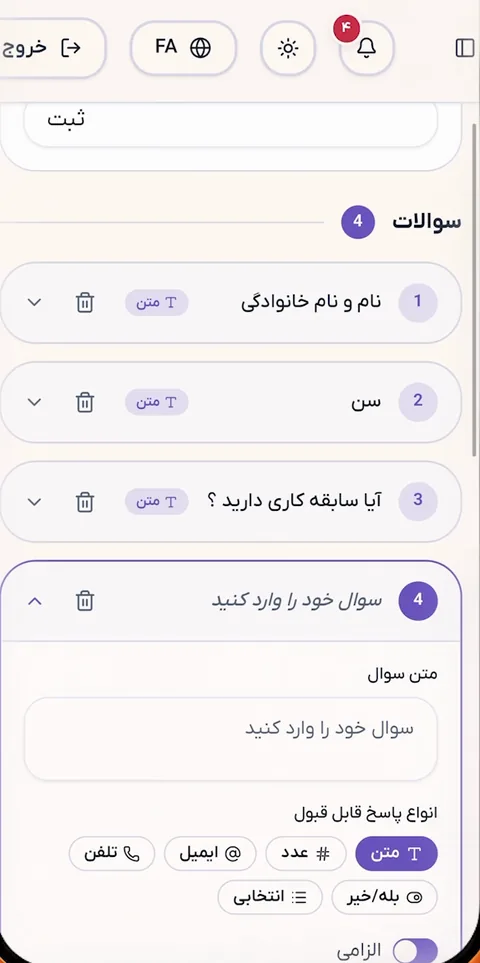
The result is a natural conversation. There is no link and no login, nothing to download, and the customer never leaves Instagram. For course sign-ups, appointment requests, quotes, surveys or custom orders, this is exactly what you need.
How a form starts
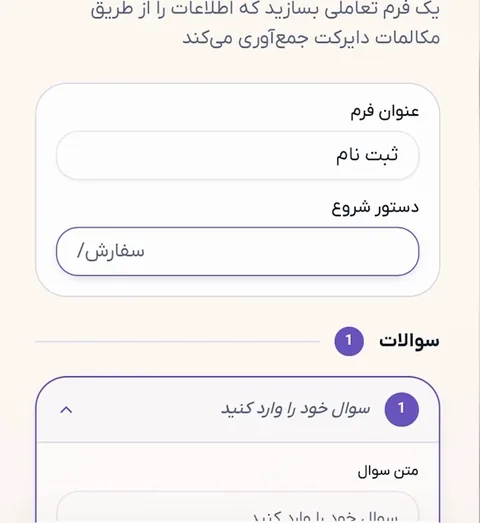
With a command in the DM
Every form has a “start command”: the word the customer types to begin, such as “register” or “appointment”. Matching is exact but tolerant of common Persian typing differences: Persian and Latin digits count as the same, Arabic and Persian letter forms are treated alike, and an extra trailing space is harmless. Keep the command short and easy to type, not a full sentence.
With a comment under a post
A form can also start from a comment. You set a few keywords, and anyone who writes one of them under the post gets the form in their DMs. Instagram allows only one private reply per comment, so in this mode that single private reply is the first question of the form, and the remaining questions follow as ordinary DMs after the customer answers. Optionally you can add a short public reply under the comment so others can see that something was sent.
If someone who is already filling in a form comments again, the form does not restart and the answers they gave are not lost.
Question and answer types
Each question has an answer type and Admino checks against it. If an answer does not match, the customer gets a correction message that you wrote yourself and the question is asked again.
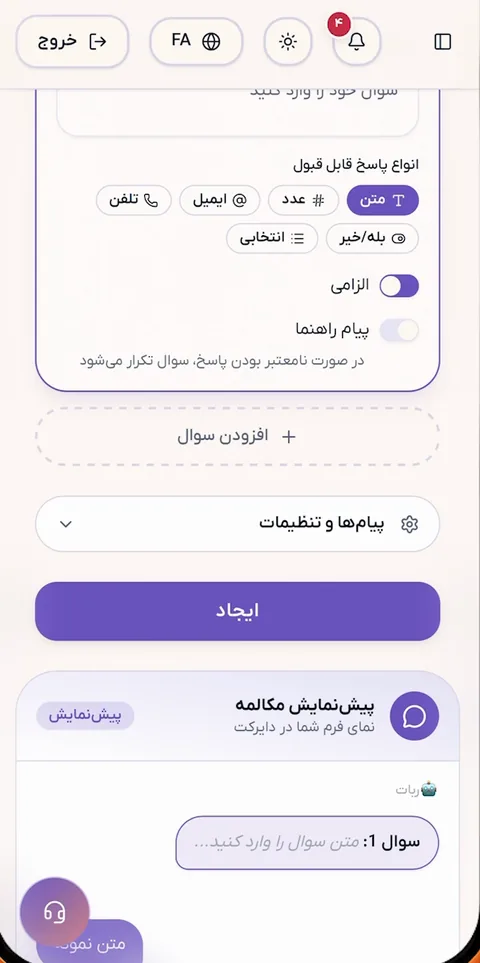
- Text: any free answer, such as a name or a description.
- Number: digits only, such as a quantity or an age.
- Email: a valid email address.
- Phone: an Iranian number, converted to a standard format and stored.
- Yes or no: a two-way answer.
- Choice: several options, one of which the customer picks.
For phone numbers always choose the “phone” type instead of plain text. Plain text accepts anything and numbers get stored in many shapes; the phone type keeps them uniform and searchable. When a question title mentions a contact number, the form builder itself suggests switching the type to phone.
Options become buttons
Choice questions appear as buttons under the message and the customer simply taps one. It is the easiest way to answer and gives the best completion rate. Instagram accepts at most 13 buttons per question; with more options, no buttons are shown and the customer must type the option. It is better to split such a question into two smaller ones.
If a customer types the option instead of tapping, that is fine; Admino compares the typed text with the options and ignores differences like a half-space or an Arabic letter form.
Welcome, closing message and skipping
The welcome message is optional but worth having: one sentence that says what the form is, how many questions it has and why. Without it, the first thing the customer sees is “Your name?”, which looks like a bot error. Admino sends the welcome and the first question in one message, so the customer receives nothing more than a single message.
The closing message is required and should say what happens next: “our team will call you by tomorrow”. Optional questions can be skipped with a single word, and by default words such as “cancel” stop the form.
If the customer sends a photo or a voice note
Forms want text answers. If a photo, audio or sticker arrives mid-form, Admino sends the same correction message and asks the question again, instead of staying silent and leaving the customer thinking the form is broken.
Where the answers go
Every form has a responses page: a list of everyone who filled it in, with search, a status filter, starring for important answers, and deletion. Each answer is tied to the customer’s name and Instagram username, so you know exactly who you are talking to. You can export to Excel; the file matches whatever filter and search are on screen.
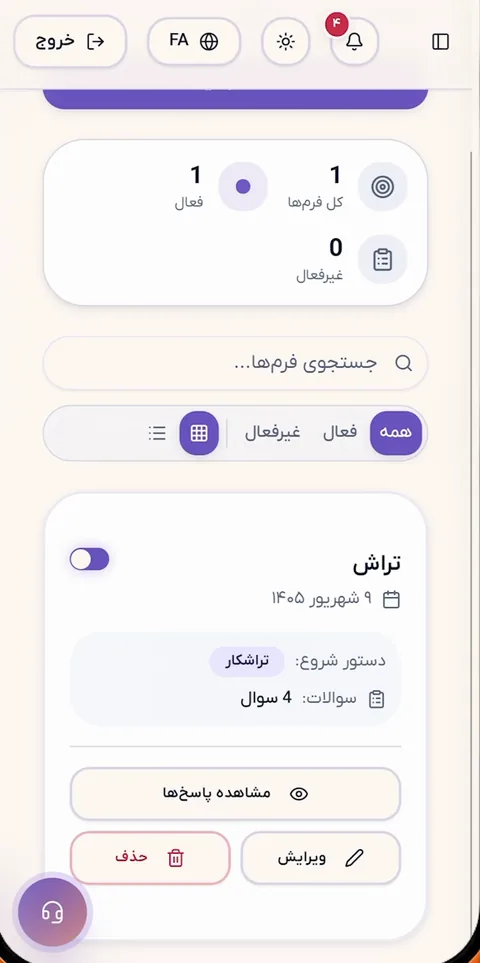
Data is never lost because a message failed to send. Admino saves the completed answer first and sends the closing message afterwards, so if that message fails for any reason, the customer’s answers are still in your table. If a customer abandons a form halfway, partial answers are kept for 30 minutes and then the session closes.
How long should a form be
In a DM form, each question is a separate message and each message is a chance to quit. The practical rule is simple: ask only what you truly need for the next step. A name, a phone number and one question about the customer’s need are enough in most cases.
- A shorter form gets filled in more completely; three to five questions is a good target.
- Ask the vital question (like the phone number) early so that you at least have contact if the customer leaves.
- Offer options wherever you can instead of free answers.
- In the closing message, say exactly when and how they will hear back.
Common examples
- A training school: command “register”; name, phone, course choice from options, best time to call.
- A clinic or salon: comment “appointment” under a post; name, phone, service type, preferred day.
- Custom orders: command “order”; name, address, size or model, extra notes.
- Post-purchase survey: command “feedback”; a score as a number, one open question.
Price and getting started
The form builder is part of the Admino subscription and has no separate cost. Each phone number gets one 30-day full Monthly subscription, activated when the number is verified, with no bank card. After that the Monthly plan is 963,000 toman and the annual plan 7,963,000 toman.
Frequently asked questions about the Instagram form builder
How does Admino’s Instagram form builder work?
The customer starts the form with a command or a comment, Admino asks the questions one at a time inside the DM, and saves the answers on that form’s responses page. No outside link is needed.
Can I collect customers’ phone numbers?
Yes. Choose the “phone” type for the contact-number question so numbers are stored uniformly. Each answer is linked to that customer’s Instagram profile and you can export to Excel.
Can a form start from a comment?
Yes. You set the keywords, and anyone who writes one under a post receives the first question of the form in their DMs. The remaining questions continue after their answer.
What happens if a customer abandons the form halfway?
Partial answers are kept for 30 minutes. If the customer returns in that time, they continue from the same question. After that the session closes and they can start again.
How much does the form builder cost?
It is not priced separately and is part of the Admino subscription: 963,000 toman monthly or 7,963,000 toman yearly, with a 30-day full free trial for each phone number.
Instagram DM Forms
Capture customer details with automated, conversational forms that run inside Instagram DMs.
Explore this featureReady to get started today?
Connect your Instagram account and let Admino handle your DMs, comments, and publishing.
See pricing